Commercial Applications
Info
The command line examples on this page use the following notation
[login]$ : login node
[rNnN]$ : compute node
[login/rNnN]$ : login node or compute node
[yourPC]$ : environment from which the login node is connected
FAQs about General Commercial Applications
Commercial applications (Mathematica, Gaussian, etc.) do not work. Command not found. module load fails.
TSUBAME4.0 requires a fee to use some commercial applications.
Detail : Fare overview
Initially, the target commercial application is not available and the following error occurs during module loading.
[ Example: ANSYS ]
[login/rNnN]$ module load ansys
Loading ansys/R25.1
  ERROR: Access to module ansys/R25.1 is denied
    You are not allowed to access this application.
    Please check https://www.t4.cii.isct.ac.jp/docs/faq.ja/commercial_apps/#apps_not_found for more details.
To use the target commercial application, go to the TSUBAME Portal and perform Application Activation.
After application activation, run it again.
Info
Some commercial applications are not available depending on the user's position. For more information, see About the position of commercial applications available in About licence restriction of commercial applications.
[rNnN]$ module purge
[rNnN]$ module load ansys
[rNnN]$ runwb2
Please note that app purchases must be made on an account-by-account basis.
Please also check I purchased a commercial application, but it is not available. .
When using Mathematica 14.1 or later
Mathematica has changed the names of GUI executable commands since version 14.1.
| Version | Execution command name |
|---|---|
| 14.0 | mathematica |
| 14.1 and later | WolframNB |
See Mathematica for details.
I am unable to complete the activation process for a commercial application.
If you are unable to Activate an Application for a commercial application, please check the following points.
- Is the position authorized to use commercial applications?
In TSUBAME 4.0, usage permissions for commercial applications are set on a per-position basis. For details, please refer to About license restriction of commercial applications. - Have you been granted the "Use Rights Application" permission within the TSUBAME group?
To activate a commercial application, you must have the "Use Rights Application" permission within the TSUBAME group. For details, please refer to Appointment of Group manager. - Has the application already been activated?
In TSUBAME 4.0, you cannot make additional purchases to extend the activation period. After the activation period expires, please perform the activation procedure again.
I purchased a commercial application, but it is not available.
Please check the following two points.
-
Commercial applications must be purchased by account, not by group.
For example, if a group admin makes a purchase, only the group admin's account can use it.
Please complete the purchase process separately for all accounts you wish to use.
( Only accounts with "group manage privileges" can make proxy purchases for accounts within a group. ) -
When you perform Application Activation within the TSUBAME Portal, the activation process is carried out on the login node and all compute nodes.
Since this process is performed on a per-node basis, it may take up to about one hour for the settings to be applied to all nodes. Once the activation process is complete, you can log in to the nodes and use the application.
If you perform activation while logged in to a specific node or Open OnDemand, or if you are unable to use the application immediately after activation, please log out, wait a short while, and then try logging in again.
A commercial application I purchased suddenly becomes unusable.
Purchased commercial applications are available from the time of purchase until the end of the specified month.
The period of purchase may have exceeded. See Application Activation, and check the status.
Pre/post processing of commercial applications
When using the commercial application on TSUBAME4.0, there are the following two cases.
Perform all processing of pre / solver / post in TSUBAME4.0 Perform pre / post processing on client and perform solver processing with TSUBAME4.0
1.When performing processing of pre / solver / post in TSUBAME4.0
In TSUBAME 4.0, basically all the functions of pre / solver / post are introduced, and in case of execution at interactive node, it is possible to perform all processing of "pre, solver, post".
How to run in interactive jobs and how to use each process depends on commercial application. Please check the manual and user's guide of each application.
2.When performing pre / post processing on client and perform solver processing with TSUBAME4.0
Operation on TSUBAME may be unstable due to compatibility of X server. This problem can be avoided by performing pre-post processing on the client, so we distribute software.
Software is provided for improved convenience. Please note that distribution may be canceled depending on the situation.
The following procedure is necessary to perform pre / post processing on client and perform solver processing with TSUBAME4.0
Step 1: Apply for software usage and obtain it
Step 2: Install the software on the client
Step 3: Perform pre processing with software on the client
Step 4: Transfer the data created in Step 3 to TSUBAME
Step 5: Create a batch script for submitting the job scheduler
Step 6: Execute the qsub command in TSUBAME and execute the batch script created in Step 5
Step 7: Transfer the result data of Step 6 to the client
Step 8: Perform post processing with software installed on the client
Error handling for each commercial application
General
The following error occurs immediately after the program runs:
unable to connect to forwarded X server: Network error: Connection refused
Error: Can't open display: localhost:13.0.
Application name: Xt error: Can't open display:
Application name: DISPLAY is not set
The GUI program suddenly terminates
Please check the keep alive setting in the terminal you use. See the FAQ "Session suddenly disconnected while working on TSUBAME4.0."
A job abruptly aborted
Although various reasons can be considered, please check the gollowing.
* Check of batch error file (usually script_name.e.$JOBID )
* Check program-specific log file
* Check the free space of the directory
reference: FAQ
About common errors in Linux
"Disk quta exceeded" error is output
The range of support by T4 Helpdesk about the program error such as segmentation fault
License restriction on commercial application usage
Please refer to "License restriction on commercial application usage'
FAQs about Specific Commercial Applications
An error such that "X fatal error. ***ABAQUS/ABQcaeG rank 0 terminated by signal 6 " occurs at modeling
An error such that "X fatal error. ***ABAQUS/ABQcaeG rank 0 terminated by signal 6 " occurs at modeling.
The error seems to occur when ABAQUS CAE is started, and modeling is performed in X transfer with MobaXterm, etc.
You can avoid this error by using VNC+VirtualGL, so please use it.
Please refer here for more information on how to use VNC from MobaXterm.
Please refer here for more information on how to use VNC via noVNC.
Please refer here for more information on how to use VirtualGL from VNC.
I'm having trouble building and running VASP.
Even if you inquire about VASP, we may not be able to respond due to licensing restrictions.
VASP Forum has been established as official user support.
Please also use the VASP Forum.
And, we have also posted some FAQs for your reference.
I would like to know the procedure to build a VASP with TSUBAME4.0.
"UCX ERROR failed to insert region" error occurs when running VASP
C++17 related errors occur when using Intel oneAPI.
I would like to know the procedure to build a VASP with TSUBAME4.0.
This is the procedure when VASP6.5.0 was built on TSUBAME4.0.
-
module load
[rNnN]$ module purge [rNnN]$ module load openmpi/5.0.7-nvhpc intel/2024.0.2 -
Copy arch/makefile.include.nvhpc_ompi_mkl_omp_acc file and modify the following
[rNnN]$ cp arch/makefile.include.nvhpc_ompi_mkl_omp_acc makefile.include [rNnN]$ vi makefile.include [rNnN]$ diff arch/makefile.include.nvhpc_ompi_mkl_omp_acc makefile.include 20,21c20,21 < FC = mpif90 -acc -gpu=cc60,cc70,cc80,cuda11.0 -mp < FCL = mpif90 -acc -gpu=cc60,cc70,cc80,cuda11.0 -mp -c++libs --- > FC = mpif90 -acc -gpu=cc60,cc70,cc80,cc90,cuda12.6 -mp > FCL = mpif90 -acc -gpu=cc60,cc70,cc80,cc90,cuda12.6 -mp -c++libs 81c81 < MKLROOT ?= /path/to/your/mkl/installation --- > MKLROOT ?= /apps/t4/rhel9/isv/intel/mkl/2024.0/ 87,88c87,88 < SCALAPACK_ROOT ?= /path/to/your/scalapack/installation < LLIBS_MKL = -L$(SCALAPACK_ROOT)/lib -lscalapack -Mmkl --- > #SCALAPACK_ROOT ?= /path/to/your/scalapack/installation > #LLIBS_MKL = -L$(SCALAPACK_ROOT)/lib -lscalapack -Mmkl -
make
[rNnN]$ make DEPS=1 -j12 2>&1 |tee make.log
Disable HCOLL when executing.
[rNnN]$ export OMPI_MCA_coll=^hcoll
[rNnN]$ make test
"UCX ERROR failed to insert region" error occurs when running VASP
Add runtime option -mca coll_hcoll_enable 0.
Example:
[rNnN]$ mpirun -mca coll_hcoll_enable 0 vasp_std >vasp.log
How to specify CPU number (%cpu) when using Gaussian?
Info
When using Gaussian provided in TSUBAME4.0, CPU numbers are automatically specified. Therefore, it is usually not necessary to set it manually.
( It is specified in the environment variable GAUSS_CDEF so that all CPUs are covered according to the specified resource type. )
The following shows how to specify the CPU number by yourself for special use, such as when you want to use only a part of the allocated CPU cores in Gaussian.
- GAUSS_CDEF is set by executing module load gaussian. Be sure to perform unset GAUSS_CDEF.
- In TSUBAME4.0, CPU numbers may start with a number other than 0 because one node is used by multiple users. You can check the dynamically allocated core number by one of the following procedures.
Note that 192-383 of the allocated cores are logical cores with hyper-threading. It is recommended not to specify logical cores because it reduces calculation efficiency.- See /sys/fs/cgroup/cpuset/AGE/{JOB_ID}.1/master/cpuset.cpus
- Exec "numactl -s | grep physcpubind"
- To specify the number assigned to the CPU to use, specify a range (e.g., “0-5”) in %cpu or GAUSS_CDEF.
To specify the number of CPUs to use, specify a number (e.g. “6”) in %NProcShared or GAUSS_PDEF.
These specifications are exclusive.
"No space left on device" error when running Gaussian
The free space in the scratch directory specified by Gaussian may have been exhausted.
Please change the scratch directory using the environment variable GAUSS_SCRDIR with reference to 環境変数 GAUSS_SCRDIR.
Info
The example scripts in the TSUBAME3 and early TSUBAME4.0 user's guides specified the following
export GAUSS_SCRDIR=$T4TMPDIR
Currently, this specification is no longer necessary because a larger capacity area (local scratch area) is set by default.
Please delete this designation if it remains, as it increases the risk of free space depletion.
When running Gaussian, working files are output to the home directory
When using Gaussian provided by TSUBAME, the environment variable GAUSS_SCRDIR is automatically set to the local scratch area.
However, if all of the following conditions are met, the environment variable GAUSS_SCRDIR will be set to an unintended value. This may cause working files to be output to the home directory or result in Gaussian execution failure.
- Executing "module load gaussian" before submitting the job.
- Specifying the -V option when submitting the job.
- Executing "module load gaussian" within the submitted job without first executing "module purge"
When using applications provided by TSUBAME4, always execute "module purge" first.
I want to know which modules are available in COMSOL. I want to use a specific module
The modules available in COMSOL on TSUBAME4 are listed below. Additional module licenses cannot be added.
- AC/DC Module
- RF Module
- Wave Optics Module
- Plasma Module
- Structural Mechanics Module
- CFD Module
- Heat Transfer Module
- CAD Import Module
Since TSUBAME can access external license servers, you can use COMSOL on TSUBAME with your own license. In that case, please note the following:
- You cannot combine a TSUBAME4 license with your own license. Please ensure you have licenses for both the COMSOL main program and the modules available on TSUBAME4.
- It is possible to use your own license server in combination with TSUBAME4 applications (binaries). However, to access the applications, you must pay TSUBAME Points (by completing the Application Activation procedure).
If you wish to avoid double payment for application fees, please install the applications yourself on a group disk or similar storage. In this case, we cannot provide support for issues related to the operation of the applications. - Since TSUBAME does not allow for fixed execution nodes, the license you use must be a network license. Please refer to this page for information on addresses.
- TSUBAME4 does not provide support for COMSOL that you have installed yourself, including installation procedures.
I want to use ANSYS Rocky
This explains how to use ANSYS Rocky.
-
When using on TSUBAME4
You can run it with the following command. However, it cannot be launched via Workbench.
module load ansys Rocky -
When using on Windows(Distribution of Commercial Applications on Campus)
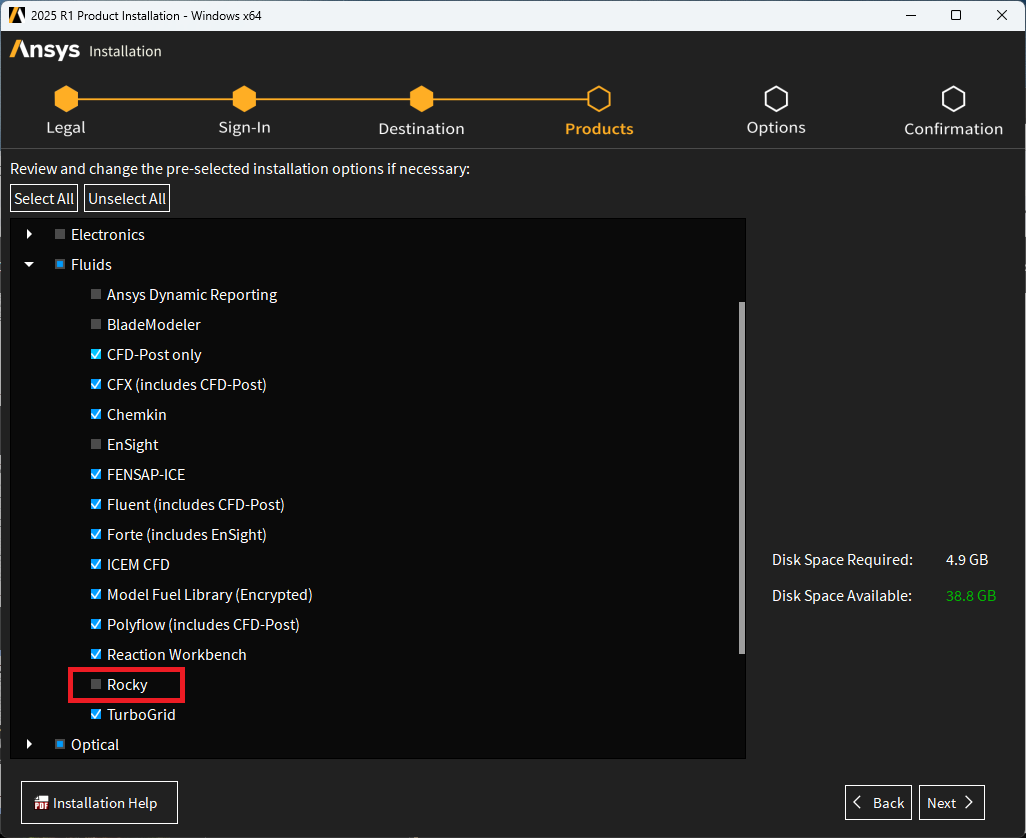
Ansys Rocky is not selected for installation by default. Please check the box for “Rocky” when selecting the products to install.
(If you already have ANSYS installed, you can launch the installer again to add Rocky as an additional installation.)